Web workbench
The Web workbench builds generation configurations from a real database schema. You can connect, edit, save, validate, generate data and inspect run records without installing the AI plugin.
The main pages are Workbench / Configs / Runs / Settings. This guide covers version 0.2.6 and its source candidates; check Releases for publication status. See the migration guide for installing released packages, source checkouts and build artifacts. Use its source installation instructions to try an unpublished candidate.
Select tables from an existing database, edit field rules, preview data and inspect relationships, then confirm the write. Configs stores reusable rules; Runs shows each table's outcome and the number of rows actually committed.
The 0.2.6 workbench uses a translucent glass design with light and dark modes. Navigation, action areas, connection dialogs and rule drawers share surface layers, while tables keep a stable reading background. Both Chinese and English interfaces use the bundled ChillRound Gothic fonts at weights 400/500; code and field identifiers use a monospace font. No external font service or system installation is needed. Solid backgrounds are used when the browser does not support backdrop blur or the system requests reduced transparency. These surfaces are rendered inside the webpage and do not depend on operating-system window effects.
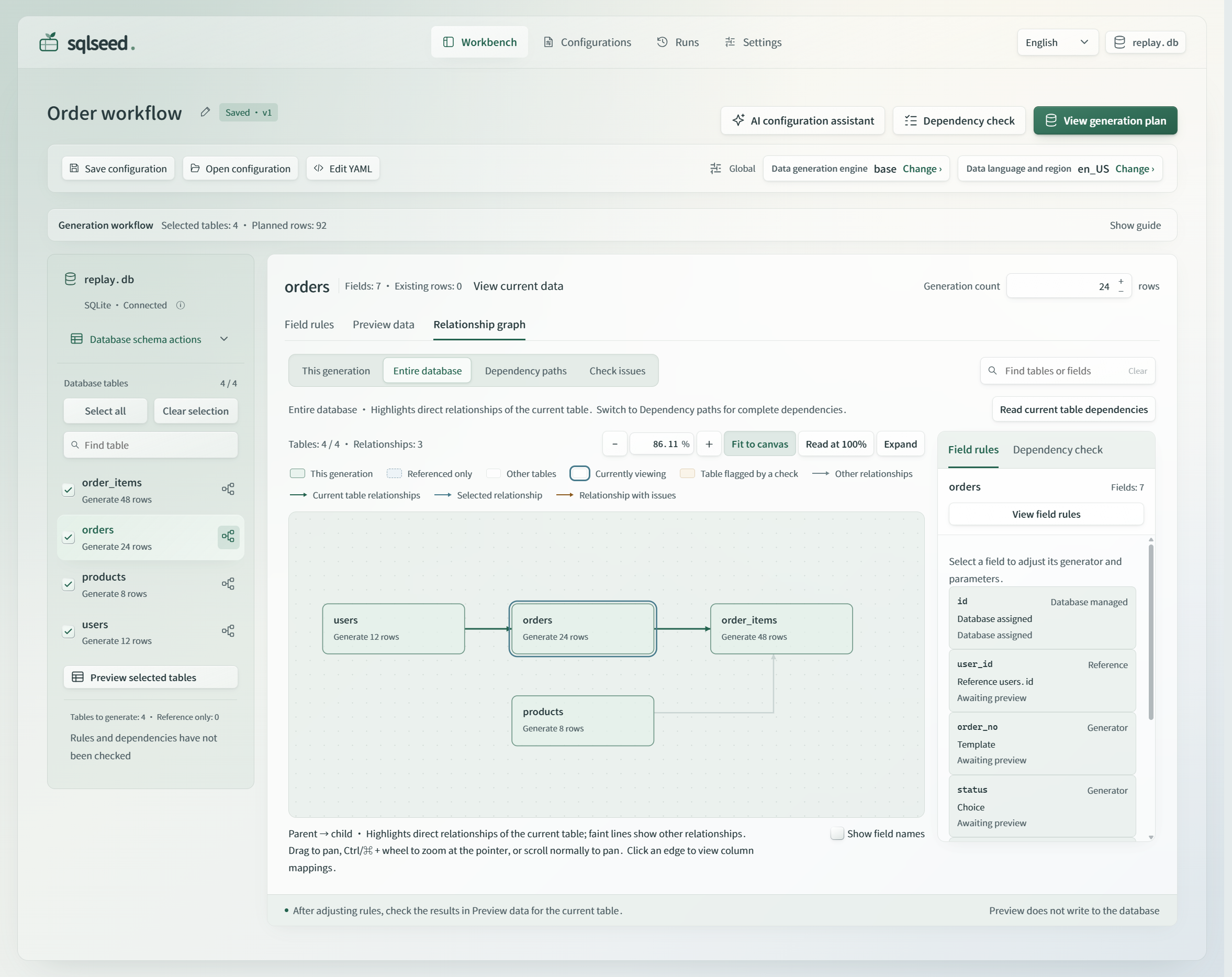
An actual screenshot of the released 0.2.5 interface. Open the full-size PNG, or see the read-only sample preview in the dark theme. Interface language and generated data language are separate settings.
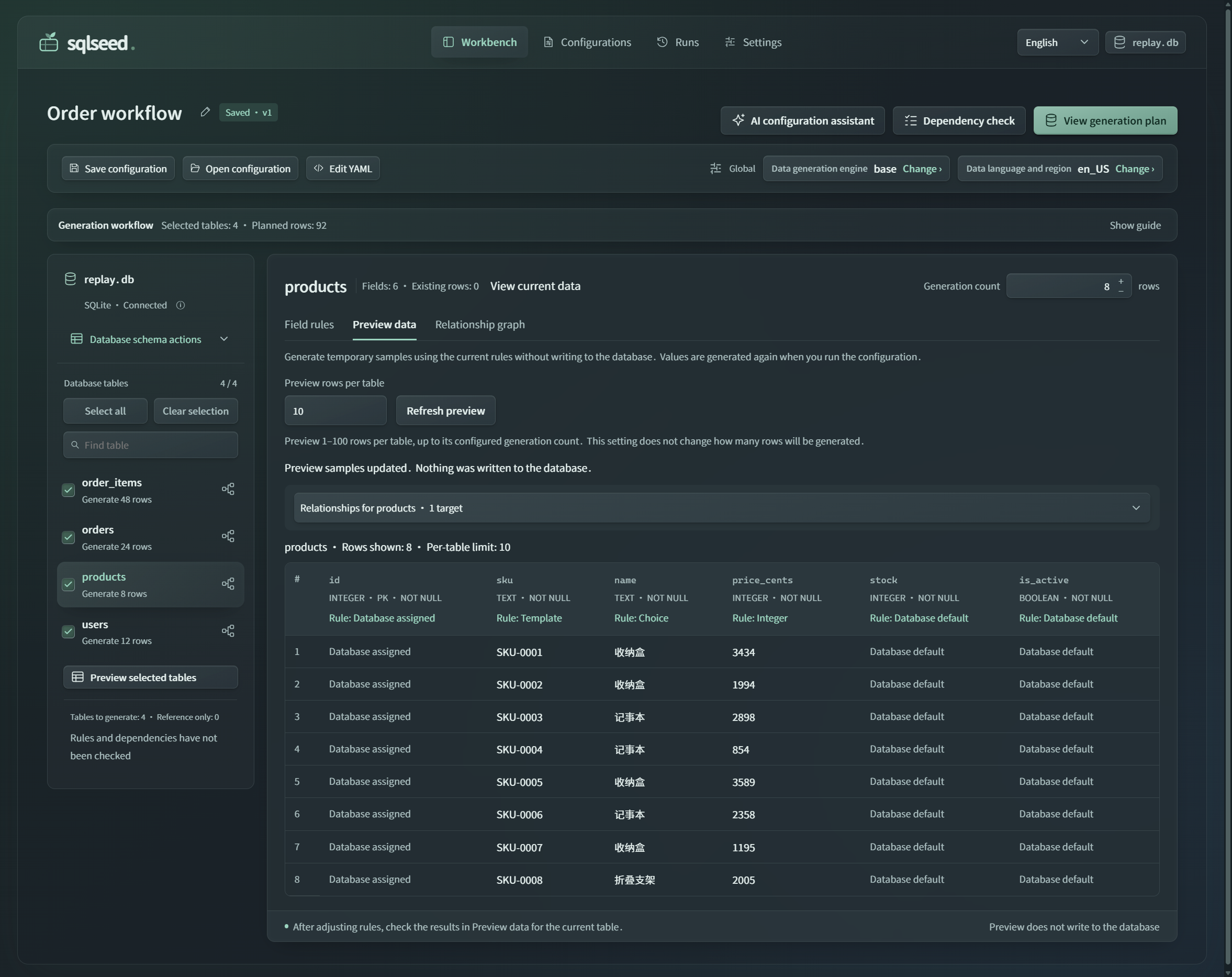
Interface refinements in 0.2.6: Data panels use solid reading backgrounds, while navigation and temporary overlays retain controlled translucency. The workbench provides a compact workflow guide, a collapsible table directory, larger touch controls and interruptible tab feedback, as described below. The screenshots above show the earlier 0.2.5 interface.
Long field identifiers wrap within their column on narrow screens, preserving the full name and the action for viewing field structure.
Install and start 0.2.6 in a Python 3.10+ virtual environment:
For source development, install both local packages together from the repository root: python -m pip install -e . -e ./plugins/sqlseed-web.
Open http://127.0.0.1:8630 and use Connect database in the top bar or initial empty state. Select a SQLite file or enter a PostgreSQL connection in the dialog. SQLite paths refer to the computer running the service; connection details identify the database target only. The global data generation engine and data language are part of the generation configuration, not the connection form. Install the corresponding dependencies before using an optional engine or database.
The SQLite connection form opens existing files only. A nonexistent path or directory produces a correction message instead of creating an empty database after a typo. An existing database with no tables offers Refresh schema and Select another database: create tables with a database tool, then refresh to begin configuration. Refreshing only makes new tables available for inspection; it does not automatically select them or generate data.
When switching between existing connections, the workbench restores each connection's configuration from the current webpage session, or creates a new configuration on its first visit. An ordinary connection switch does not carry the previous database's configuration ID or run-snapshot link into the new database. Unsaved work stays associated with its connection in the current page and is not automatically saved to another database. Opening a configuration link for a different database explains the target mismatch and offers a return to the current database or selection of the matching database. This does not mean the database cannot be read, and it does not bypass target-identity checks.
PostgreSQL requires the Core postgres extra in the Python environment running the service (for 0.2.6, use python -m pip install 'sqlseed[postgres]==0.2.6'; for source, use python -m pip install -e '.[postgres]'). It provides psycopg 3, which is the default driver for plain postgresql:// URLs; explicitly specified drivers are preserved. The database may be local or on a reachable server. Web currently supports schema inspection, preview, appending data and reading results. Clearing tables before generation is SQLite-only; composite and cross-schema foreign keys are not yet supported for PostgreSQL.
Interface and data languages
The 0.2.6 top bar offers 简体中文 / English, with the main navigation labeled Workbench / Configs / Runs / Settings in English. Version 0.2.6 shortens Configurations to Configs, keeping the same page and actions. On first use, the first supported browser language is selected, falling back to English if none matches. An explicit choice is stored in the current browser and synchronized across tabs on the same origin. Switching still works for the current page if browser storage is blocked.
Switching updates visible messages, accessible names and display dates and numbers in place. It does not reload the page, save a configuration or send a database or AI request. Unapplied rules, input, focus, table selections and open dialogs remain intact.
Data language and region controls generated content independently of the interface language. Changing the interface does not alter the provider, locale, row counts, random seed, configuration name, table or column names, YAML or original database values. Model and component names retain their original spelling. Older run records and unknown third-party diagnostics may retain their original text with an explanation in the current interface language. Arbitrary business data is not automatically translated.
Language resources ship with the package and do not require an external translation service. See Web UI language maintenance for coverage and guidance on adding messages. This guide describes implementation behavior, not completed acceptance testing for every browser or distribution environment.
Running with a server's Python environment
Core and ordinary Web features support Python 3.10 and later; they do not require the local repository's .venv. The 0.2.6 workbench requires Core >=0.2.5.dev0,<0.3; Core 0.2.4 and older lack the shared connection and diagnostic interfaces needed here. Install Core and Web from the same repository when testing source. A server virtualenv or system Python with the required dependencies can run the service, which uses the interpreter that launches it. When a browser accesses a server, that server performs database connections, file access and data generation. The webpage cannot select or manage an arbitrary Python environment on another machine.
The default sqlseed-web launcher is intended for local access and listens on 127.0.0.1:8630. An external ASGI deployment can use the sqlseed_web.app:create_app factory. Web currently has no multi-user authentication, so external deployments must provide authentication and access controls; it must not be exposed directly as a public multi-user service. In-page package installation and removal additionally require a supported isolated environment, the default managed launcher and local requests. With system Python, external ASGI hosting or remote access, the deployment administrator manages dependencies; ordinary features remain available.
Installing, updating and removing optional components
Web started with the default launcher can install or remove AI, CLI, MCP and Mimesis from Settings → Plugins and versions. Select a component, review the operation and confirm. The page shows preparation, installation or removal, and service-recovery progress. You do not need to rerun the startup command or refresh the page.
When a newer stable version of an installed optional component is found, Review update plan checks its official wheel, Python compatibility, current dependencies and reverse dependencies, then displays the old and new versions. The plan can update only the selected component. It blocks missing dependencies or changes that would require upgrading or downgrading other packages; use the environment's original package manager to update those packages together. Core, Web and Faker have no in-page update action, and development versions are not automatically downgraded. After confirmation, the service verifies file and metadata SHA256 hashes, freezes other components and installs the verified wheel. Failure does not guarantee rollback; service recovery follows the process below.
Operations are accepted only when the service is idle. Active database requests, generation tasks or AI analysis block the change and prompt you to retry later. An AI request whose result delivery was cancelled still counts as busy until its underlying call exits. The service temporarily preserves connections and AI session settings, stops the business process and serves progress through a maintenance process. After the package change, it starts a new business process and restores the original connection IDs. The page retains the current draft and editing state. SQLite in-memory databases cannot survive this process replacement, so their presence blocks the operation before packages change.
Installation fixes the current interpreter and installed versions; it does not automatically upgrade Core or Web. Removal does not automatically remove dependencies. CLI cannot be removed while AI is retained, and Core, Web, Faker and Base cannot be removed. The operation fails if no compatible wheel exists or dependencies cannot be satisfied with the frozen versions. An installation failure still triggers an attempt to restore the business service, but does not automatically undo partial package changes. If service recovery fails, Retry recovery retries recovery without repeating installation or removal. Connections that cannot be restored are reported individually; the service neither substitutes other connections nor creates empty SQLite files.
Recovery diagnostics in 0.2.6: If recovery fails, expand View execution output to distinguish startup timeout, initialization failure, exit before readiness and recovery-confirmation failure. Component installation and workbench recovery are separate outcomes; a recovery failure does not require reinstalling the component. If the original process has not exited safely, wait for its work to finish before retrying recovery. The system retains management of that process and the environment lock. It does not forcibly interrupt database tasks or allow a replacement process to take over the port concurrently.
Reinstalling a removed component depends on a compatible version being available from the package index. Development or locally installed versions may not be retrievable from the default index; the removal confirmation explains this limitation. Automatic Web recovery does not restore a removed component. If a component fails to load, first check that a compatible installation package is available before deciding to remove and reinstall it.
In-page package changes support writable, isolated virtualenvs on Windows, macOS and Linux. They are unavailable in read-only or system-managed environments, environments sharing system dependencies, and externally hosted create_app() deployments; ordinary Web features remain usable. The default launcher holds an exclusive environment lock for its lifetime. Other services honoring that lock cannot use the same environment concurrently. Older services and external terminals do not follow this protocol and should not modify the same environment at the same time. See the component management design for the full boundaries.
Manual installation does not require PowerShell. Settings provides commands with the exact path to the current Web interpreter: PowerShell or CMD on Windows, and terminal commands on macOS/Linux. Windows paths containing special characters such as % or ! are offered only in a PowerShell form that preserves their literal values. You can also use a generic python -m pip ... command (or uv pip ... --python python when only uv is available). Activate the environment running Web and run python -c "import sys; print(sys.executable)"; verify that its output matches the Python path shown on the page before installing. Restart Web after manual changes. On Windows, the managed launcher passes the environment lock through a shared file handle, uses a Job Object to clean up the installer and descendants, and replaces the business process. If termination of the installer process tree cannot be confirmed, it retains the environment lock and maintenance state; Retry recovery retries cleanup first, without repeating package changes.
Connections and sessions
The Connect database dialog also manages connections in the current service:
- Add connection: select a SQLite file or enter the PostgreSQL host, port, database and credentials. A successful connection switches the workbench to that database.
- Switch to this connection: reuse an existing connection without creating another. The current connection is clearly marked.
- Disconnect and remove: close the selected connection session and remove it from the list. This does not delete the database, its records, saved configurations or run records. Wait for active tasks or database operations to finish before disconnecting their connection.
The list groups sessions by database target, with multiple independent sessions allowed for the same target. File paths or redacted server addresses help distinguish identical file names and duplicate sessions. Removing an unused session does not change the current workbench. Removing the current session leaves the workbench disconnected, and refreshing does not automatically switch it to another connection.
SQLite file paths and equivalent file: URIs share a target identity; existing configuration keys for ordinary file paths remain unchanged. Export configurations associated with URIs that older versions parsed incorrectly, then explicitly import them into the correct target. They are not automatically rebound by name or matching schema. Web does not currently support custom SQLite VFS implementations. URIs containing NUL, unencoded TAB/CR/LF or invalid UTF-8 are rejected before the database is opened.
Bare file paths preserve literal file names: %41.db, for example, is not interpreted as A.db. SQLite URL file names are preserved, and nested file: URIs are decoded once only. Database opening and workbench configuration identity use the same parser, compatible with SQLAlchemy 2.0 and 2.1.
These are connection sessions in the current service process, not persistent connection profiles. Reconnect after restarting the service, and re-enter PostgreSQL credentials. The browser remembers only the selected session identifier or explicit disconnected state, not connection passwords.
From rules to a run
- Connect in Workbench to load the real schema. Select the tables to generate in the left sidebar and set their row counts beside the current table's title.
- Click a table name to inspect its field rules. The node icon on its right opens that table's full dependency path. Selecting a checkbox changes the generation scope; browsing another table does not add it to the scope.
- Click a field name for read-only schema details, or its value rule to choose an existing generator and edit parameters in the right drawer. Applying updates the same configuration; cancelling discards the current unapplied change. Foreign keys retain their database-defined sources, and derived columns use source fields and expressions. Primary-key, uniqueness and nullability restrictions come from the schema.
- Save configuration saves applied rules, editing drafts for unselected tables and the current view as a version. Open configuration reopens a saved configuration for the same database. Closing the drawer or leaving Workbench discards unapplied drawer edits.
- Use Dependency check to inspect reference sources, rule issues and the selected tables' generation order. The current table has Field rules / Preview data / Relationship graph views. For new configurations, the graph defaults to This generation, showing selected tables and the reference tables they need, without unselected downstream tables or unrelated arrows. Entire database and single-table dependency paths retain the full schema. Opening Preview data generates temporary records for the current table on its first visit: 1–100 rows per table, 10 by default, with no INSERT. Previewing an unselected table does not add it to the write plan. Use Preview selected tables in the left selection area to inspect several tables together.
- View generation plan saves the current configuration, reruns validation and opens write confirmation. In 0.2.6, the guide's next action remains available when collapsed. The top-level plan action appears only when the guide is hidden, or when it is collapsed and its next action is not already the plan. The Confirm stage also opens confirmation without writing. Confirm the target, quantities, version and order before clicking Write to database.
- Inspect each table's outcome and actual committed count in Runs. The server executes the task; switching or closing webpages does not cancel it.
Row counts and generator rules in the workbench come from the current configuration; samples come from Core. The page does not insert demonstration records. If an empty parent table has not generated real keys yet, samples depending on it may be unavailable. Validation explains the reason instead of inventing auto-increment IDs.
The workbench guide suggests the next step for the current state. With no tables selected, it locates the selection area. After selection, it offers manual rule review, optional AI and direct preview. Configuration changes prompt a new preview, and all selected tables are marked as previewed only when each has returned complete samples for the current configuration. Invalid input takes priority and links to its control; blocking validation issues lead to Dependency check. These prompts do not prove that business rules have been reviewed or replace checks before writing. You can collapse the guide at any time, and the browser remembers that preference. Version 0.2.6 starts collapsed when no preference exists and preserves an existing expanded or collapsed choice. Its current next action and three stage buttons stay available outside the collapsed explanation, with short visible labels and full accessible names.
In 0.2.6, screens up to 760 CSS pixels wide place the table directory in a disclosure. Its summary distinguishes the table being viewed from the number selected for generation. Expand it to search, select tables or open dependency paths. Selection and error-location actions open it before moving focus; choosing a table closes it and brings the table content into view. Browsing a table and checking it for generation remain separate actions. On these narrow screens, or with a coarse pointer such as touch, table selection labels, dependency buttons and quantity stepper buttons provide at least 44×44 CSS-pixel targets. Steppers use a horizontal layout; invalid quantity input remains unchanged and must be corrected explicitly.
The guide offers three revisitable stages: Set rules → Preview samples → Confirm write. Selecting a stage highlights it and locates the rules, samples or confirmation dialog. Missing table selections and invalid input are explained with links to the relevant controls. Returning to rules does not clear the configuration or samples; subsequent changes update the next-step suggestion. AI retains a single top-level entry point. The sidebar shows validation status, with details available from Dependency check at the top. Tabs use short decorative feedback; selection takes effect immediately. In 0.2.6, a new selection, removal of the target or enabling reduced motion cancels pending and running feedback. Vertical feedback decorates the selected surface without fading the label; arrow-key focus exploration does not play a selection animation. Editing and confirmation dialogs keep Cancel / Back and submission actions at the bottom. Read-only previews and current-database-data dialogs use a top-right close control to avoid duplicate exit buttons. Esc still closes the dialog and returns focus to its originating action. Cancelling editing does not apply unsubmitted changes.
In 0.2.6 write confirmation, a status beside the footer actions reports checking, submitting, blocked, failed or ready. View reasons moves focus and scrolls to the full diagnostics only when selected; incoming responses do not move focus. This status explains the existing checks and does not bypass validation or the final write action.
Generation appends by default, preserving existing records and continuing ID allocation. SQLite also offers Clear selected tables, then generate in the confirmation dialog. Review the tables and row counts to be deleted, then explicitly choose Clear and generate. Clearing and generation share one transaction and restore the original data on failure. References from unselected tables, triggers and unsupported cases block the operation; it neither expands the scope automatically nor disables foreign keys. PostgreSQL currently supports append only.
Passing append checks means ordinary rules and dependencies are usable. Switching to clear mode adds checks for unselected downstream tables and deletion effects. The confirmation dialog and sidebar show checking, clear-check failure or success together, keeping these two kinds of validation distinct.
Choosing Back to adjust or pressing Esc in clear confirmation retains the current clear-plan state. Changing table scope, row counts or rules marks it as requiring another check. Reopening View generation plan continues that clear plan and checks the latest data instead of reusing the previous plan; Reset auto-increment sequence must be selected again. Explicitly switching to append, leaving Workbench, changing connections or opening another configuration ends this adjustment flow. A new generation flow defaults to append.
A previously validated clear scope remains marked as reviewed after returning, rather than treating a normal return as failure. If unselected downstream tables block clearing, the plan and guide emphasize Include related tables and continue rebuilding, listing clickable related tables. Other options contains manual adjustment and switching to append. The candidate scope shows added tables, existing record counts, generation quantities and the expanded total scope, then runs separate rule validation. Unresolved cycles or other issues prevent confirmation and provide links to the conflicting tables. Confirm scope and view clear plan saves the new scope, reruns checks and opens the clear plan. This changes only the configuration; the final Clear and generate action writes to the database.
Valid generation rules and an unresolved clear scope are separate outcomes: usable rules do not imply that deleting existing records leaves other tables unaffected. To add test data, keep existing records and switch to append. To rebuild a group of tables, include downstream tables that still reference the records being removed. Upstream tables already supplying reference data usually do not need regeneration. Repeatedly selecting upstream tables just to remove a warning expands deletion effects and may introduce unsupported cycles. Review added tables, existing counts and generation quantities before expanding the scope, then check again. Changing scope alone does not clear the database.
For cross-table cycles, distinguish appending from rebuilding from scratch. For example, a department's manager references an employee, while that employee references the department. SQLite supports appending when every single-column foreign key within the cycle already has a non-null parent key. Preview and writing both use parent keys present before the operation; newly generated cyclic records do not reference one another. Fields are not automatically changed to NULL, and no cross-table backfill is performed. The entire selected scope appends in one transaction. Sources and rules are rechecked before writing, and any batch failure rolls back all records added in that operation. Existing parent keys do not guarantee that UNIQUE, CHECK or other constraints can be satisfied; normal rule checks and database constraints still apply.
The workbench blocks cycles with empty sources, composite or overlapping foreign keys, configured associations, or PostgreSQL. Selecting all tables, changing row counts or retrying unchanged does not supply missing source keys. Check issues identifies the exact tables and fields in the cycle. You can preserve the cyclic tables and their upstream base data, manually reduce the generation scope and check the remaining tables. Even a SQLite cycle with existing sources cannot be cleared and rebuilt: clearing removes the parent keys it needs, and resetting auto-increment sequences does not solve that. Rebuilding these tables from scratch requires a dedicated, staged generation and backfill plan that respects the actual constraints. The interface does not automatically change rules or delete records.
The clear-plan checks above apply to SQLite. PostgreSQL currently supports append only; clearing and rebuilding requires a database tool or dedicated script. Reducing the generation scope does not change this capability boundary.
Reset auto-increment sequence is separate from clearing. SQLite AUTOINCREMENT retains its historical counter unless you explicitly reset it. Ordinary INTEGER PRIMARY KEY columns have no such historical sequence and start at 1 when the database assigns IDs in an empty table, so they need no reset checkbox. This does not guarantee the behavior of rules that assign explicit IDs. When disabled, the checkbox explains whether the reason is append mode, no resettable auto-increment column, or incomplete generation checks with no usable clear plan yet. Resetting cannot remove generation blockers such as cycles. Preview does not predict final written IDs. Run records distinguish planned rows, actual committed rows, write strategy and rollback status. Configurations created from snapshots still default to append.
Application settings
Settings is available without a database connection and contains AI service, Plugins and versions, Defaults and Appearance.
Appearance offers light, dark or system mode, with light as the default. Changes apply immediately. The preference is stored only in the current browser, survives refresh and synchronizes across same-origin tabs; the component interaction sample page uses the same setting. System mode follows operating-system appearance changes. Switching appearance does not modify AI service settings or generation configurations and does not send AI or business requests.
The plugins page reads the Python version, installed distribution versions and import status from the environment running Web. It groups components into the current application (Core, Web), optional extensions (AI, CLI, MCP) and data generation engines (Base, Faker, Mimesis). Versions are installed versions, not necessarily the latest. Available means a component can load; it does not prove AI connectivity or validation of every database capability.
Each entry identifies whether it is built in, required or optional, alongside its actual installation status. Base is built in, Faker is installed with sqlseed, and Mimesis is installed on demand. Faker is a separate distribution and a required dependency of the current Core. Basic Web does not need CLI; installing AI also installs Core and CLI, while MCP depends on Core. Optional components offer install or remove controls according to management capabilities. Missing required components and installed components that fail to load show repair guidance. The installer prefers pip from the current Web interpreter; if pip is absent, it detects uv and pins the same interpreter with --python. It does not guess pip versus pip3 from the operating system. Check for updates is explicit and never automatically upgrades packages; see the operation and recovery flow above.
Check for updates queries PyPI only when clicked, looking for the latest non-yanked stable versions of Core, Web, AI, CLI, MCP, Faker and Mimesis and comparing them under PEP 440. It displays the current and latest versions, available updates or failure reasons, and separately explains when a development version is newer than the latest stable release. Successful results are cached for 15 minutes and failures for 30 seconds. The request sends no database details, model endpoints, keys or local paths and performs no installation or upgrade. A newer version is not necessarily compatible with the current environment; installation must still pass dependency checks.
The query timeout covers DNS resolution and response headers as well. When it expires, the page stops waiting and reports failure. A request still running retains that component's query slot to prevent repeated clicks from accumulating background requests. Late results do not overwrite the already-returned cache state. If a temporary directory cannot be cleaned up after installation, the page reports the cleanup failure while retaining the installation result; it does not reinstall automatically. The default managed mode still attempts to restore the business service.
After removal, Web marks a component as uninstalled and disables its optional features even if editable source or cached modules remain importable. Without AI, ordinary service settings remain visible, but connection detection and rule analysis are disabled. An installed AI component that cannot load shows repair instructions. If a configuration selects Mimesis and it is missing or fails to load, preview, validation and execution explicitly request installation or repair. You can still save the configuration; the engine is never silently replaced.
After component changes, Settings rereads availability. Late settings, detection and component-list responses from the old service cannot reinstate invalid state. A failed refresh can be retried, preserving unsaved service settings. In environments without in-page installation, missing components retain expandable administrator installation guidance; both the action and guidance are never hidden together.
AI service type, endpoint and model are saved to sqlseed/settings.json in the user's application-data directory. SQLSEED_WEB_SETTINGS_PATH overrides the path; with SQLSEED_WEB_WORKSPACE_PATH set, the default is in that file's directory. Saving uses atomic replacement; a failed write leaves the effective configuration unchanged. Settings are shared among browsers using the same service and restored after restart. UI session overrides, saved settings and environment variables are merged in priority order. Keys are separately bound to a service type and full endpoint, and are not passed to another service when the address changes.
The interface displays the settings file actually used by the service, selected for the startup user and operating system; for remote access, that path is on the server. With no changes, Save is disabled and explains that there are no changes to save. Local services usually do not need an API key unless authentication is enabled. Saved state and model connectivity are shown separately: successful saving does not mean AI analysis has passed.
Keys come from environment variables or memory in the current service. They are never stored in the settings file, URL, localStorage, generation configuration or run records. Disabling a key for the current service lasts only for that process; an environment variable may take effect again after restart. When entering Settings from the assistant, the analysis scope and business description remain in memory and are restored only by Return to AI assistant. They are not restored after leaving for other pages, refreshing, or invalidation of the connection, configuration or schema. Returning does not automatically analyze or revive old suggestions.
Defaults stores the engine, data language and region, generation rows per table, preview rows per table and optional random seed in the current browser. These values apply only to the first or explicitly created new configuration; they do not override opened or imported configurations or reused run snapshots. Preview rows affect samples only. The seed is written to each table in a new configuration to help reproduce data in the same environment, although existing data and dependency changes may still affect results. This language controls generated content, not the interface. The default AI model remains in AI service. Saving unavailable Mimesis as a default preserves that choice and asks you to install it or explicitly change engines; there is no silent substitution. Clearing tables and resetting sequences always require confirmation for each operation and cannot become default preferences. On small screens, main navigation moves to a second row while retaining access to every main page.
AI configuration assistant
The workbench top bar provides AI configuration assistant, and the usage guide and field-rule panel can open the same assistant. Depending on plugin and service settings, the guide offers information, setup or rule suggestions and defaults to selected tables, or the current table if none are selected. The top-bar entry defaults to the current table. Scope selection, analysis and suggestion review stay in one assistant; service setup is on Settings → AI service. The assistant helps interpret fields, match existing generators and suggest relationships between fields in the same row. Analysis scope is independent of generation scope. It neither writes business records directly nor replaces confirmed configuration in the background.
After connecting, the entry remains visible even without the AI plugin. Its status distinguishes a missing plugin, a plugin that failed to load, incomplete AI setup and completed settings. A missing plugin links to plugin settings; load failures link to component status and environment repair; incomplete setup offers Settings. With settings present, the assistant shows the service and model summary. Completed settings mean only that required values were supplied, not that the model connection succeeded. A status-read failure is reported explicitly and is not treated as a missing plugin.
When a compatible version is available from the package index, install AI through Settings → Plugins and versions, wait for automatic service recovery, then configure the service. Developers can install from source before starting Web:
python -m pip install -e . -e ./plugins/sqlseed-cli -e ./plugins/sqlseed-ai -e "./plugins/sqlseed-web[ai]"
sqlseed-web
Follow this sequence in the AI panel:
- Open Settings → AI service, choose an OpenAI-compatible service, Google AI Studio, Ollama or LM Studio, and enter its endpoint and model. Local services usually need no API key; configure remote authentication as required by the provider. Ollama can call cloud models, so a local endpoint does not guarantee local inference.
- Use Test connection to fetch the model list with the current unsaved form. Detection does not save settings or prove that a model has completed analysis. Select a model name to fill it in, then explicitly save. Retest after changing service or model. Keys entered in the interface are used only in the current service session, never filled back into the page or saved in generation configurations.
- Choose the current table, selected tables, entire database, specific tables or specific fields. Optionally describe business rules, such as “total equals quantity multiplied by unit price.” Column analysis includes its full table and necessary upstream schema as context but can change only authorized columns. Analysis sends only schema, constraints, dependency descriptions for protected rules, engine/locale, business instructions and the generator catalog. It sends no connection address, credentials or existing records. One analysis accepts at most 50 tables; an oversized schema asks you to narrow the scope instead of silently truncating it.
- Compare current rules, suggested rules and reasons, select suggestions and choose Apply selected suggestions. Related suggestions form one selection group and apply atomically. Relationship suggestions show source → target and read-only samples; foreign keys whose sources still need generation explicitly explain why samples are unavailable. Suggestions start unselected. Complete drafts for unselected tables, including counts, seeds and advanced settings, remain intact, and applying does not add those tables to generation.
- Preview and validate the resulting configuration, then View generation plan and explicitly confirm writing. AI's interpretation of business meaning still requires your review.
Adjust rule on a suggestion card opens the standard field editor for refining ranges, enums and other parameters before application. Saving changes only the suggestion copy; cancelling preserves the suggestion. Adjusted groups must be selected again, and their old samples and relationship descriptions become invalid. Before final application, the complete candidate configuration receives read-only validation. It applies atomically only after validation passes and the current document remains valid. Invalid input and late responses do not change the original configuration.
Specific-field selection supports searches by table, field or qualified name such as orders.promised_at. Search only filters the display; existing field authorizations remain. The interface separates total selected, selected inside the filter and selected outside it. Select filtered results adds only editable fields; Clear selection removes all field authorizations, including those outside the filter. Protected fields are grouped by table with expandable reasons. They remain available as analysis context but do not count as editable fields. These actions do not change generation checkboxes in the left sidebar.
Relationship suggestions support only four server-compiled templates: same-type copy, ordered text concatenation, multiplication of two numeric values, and date offset by a fixed number of days. Templates explicitly propagate NULL and validate source/target types, protected fields, and the existing and proposed derived-field DAG. The model cannot submit arbitrary expressions, native methods or new generators. Primary keys, foreign keys, computed columns and existing derived/native rules remain unchanged. A DEFAULT is protected only when the current rule actually uses the database default. For example, a balance column with DEFAULT 0 that currently uses a float generator can still receive AI range suggestions.
The entire candidate configuration receives read-only checks and small sample validation, including parseable single-column CHECK constraints. This is not a formal proof for arbitrary SQL CHECK expressions; final writes remain subject to database constraints. Suggestions that fail configuration, source or generation checks are not applied. If the configuration, connection or schema changes during analysis, analyze again; old results cannot be applied.
During analysis, the dialog footer continuously displays the actual stage and elapsed time: reading schema and rules, waiting for the AI model, validating suggestions, and generating read-only samples. Model waiting does not use a fabricated percentage. On failure, View issues locates the specific table, field and constraint cause; network, authentication, rate-limit and response-format errors are distinguished. Sample validation has an attempt budget to prevent repeated retries of impossible uniqueness or other constraints.
The current AI plugin distinguishes empty responses, output-length limits, invalid JSON and missing suggestion lists. If a normally completed model response omits final JSON structure delimiters, limited recovery can add unambiguous closing brackets only, without inventing fields or business values. Truncated responses caused by the output limit are rejected. Recovered output still undergoes authorization and rule validation; recovery neither applies results automatically nor adds model requests. Independently installed older AI plugins remain usable, but diagnostic capabilities depend on their version.
A request uses the AI service settings captured at analysis start. Changes from another page do not redirect that active request. Closing the dialog or waiting longer than 180 seconds stops result delivery and cancels subsequent processing. An already-issued model network call may still need to return, and the same connection cannot start another analysis until its old task exits. Restarting Web invalidates the original connection session; reconnect the database before analyzing again.
When custom column mappings or enrichment involve DEFAULT fields, opening the assistant first resolves rules read-only before showing editable fields. Closing the assistant or changing configuration discards late results. This precheck calls no LLM and returns no database records.
After AI suggestions are applied, the current configuration's guide recommends previewing first. Configuration changes invalidate that prompt; AI suggestions are not treated as proof of business correctness.
Missing plugins, unconfigured models, connection failures and analysis timeouts all show their status and next steps. Manual editing, preview and generation remain usable. Generation executes confirmed rules without implicitly calling AI for automatic repair.
Database schema and generation configuration
Export graph JSON under Database schema actions in the sidebar exports version: 1 JSON with nodes and edges. Each edge preserves grouped parent-to-child column mappings and points from the parent table to the child referencing it. Importing this file allows independent schema browsing; it creates no database tables and does not replace the current generation target.
Edit YAML opens the configuration document, defaulting to YAML while retaining Core's existing JSON load/save support. File reading, download format and download actions are in the editor toolbar; the footer contains only Cancel and Apply configuration. It preserves root mappings/associations, table seed/batch_size, column constraints/derived fields and other configuration. Unknown fields and configurations the workbench cannot execute produce explicit errors rather than being deleted before execution. Export omits credentials such as URL passwords; supply connection details as needed when executing separately.
The configuration title, save/open actions, engine and data language, document editor, validation and data generation all refer to the same configuration. Field rules, the relationship graph and the right drawer are views of that document. Database schema actions manages schema only. Refresh schema synchronizes fields, foreign keys and row counts without generating samples. Click the database name in the sidebar to view the entire graph; its adjacent information button shows connection facts.
Graph scopes include the entire database, full dependency paths, upstream, downstream, adjacent tables only and validation issues. A full path includes downstream tables of its starting table and every upstream source those tables need. It does not continue into unrelated downstream tables of those source tables. The database overview shows the distribution of relationships. Read current table dependencies switches to the full path and centers the current table at 100%. Search accepts table and field names, shows match counts and opens the selected result's full dependency path. Check issues collects errors and warnings from the current dependency check, such as missing sources and circular references, and displays their count. Not-yet-checked and checked-with-no-issues states have different explanations; neither implies that every database write strategy has passed preflight checks.
The zoom percentage is the graph's actual size ratio; 100% is the nodes' natural reading size. Enter a percentage directly and press Enter or move focus to apply; Esc restores the current ratio. Decimal values and a trailing % are supported. The valid range depends on the current graph and canvas. Invalid or out-of-range input is retained with an explanation and does not change the graph. Fit to canvas shows the entire current scope, reducing large graphs below 100%; Read at 100% restores natural size, with panning available to inspect the rest. Clicking another table changes only the current inspection target and keeps the canvas stable. The path title continues to name the actual path origin instead of relabeling it as the current table. Read current table dependencies explicitly switches the path; returning to this view retains the distinction.
The legend explains This generation, Referenced only and Other tables. A node's inner border indicates its status in the plan; an independent outer ring identifies the current table. The entire-database view highlights only relationships directly connected to the current table, avoiding a hub table highlighting the whole graph. Full chains remain available in dependency paths. Ordinary relationships use a neutral color, current relationships green, selected relationships blue and issue relationships a warning color. Each line and its arrow share one color, with these states explained in the legend. Selection does not rearrange the graph, change zoom, path origin or generation checkboxes, or play continuous animation. Switching This generation / Entire database / Dependency paths / Check issues or path scope applies immediately. Only the selection background slides briefly; buttons and text do not move. Reduced motion switches directly.
Moving the pointer over the graph retains its normal cursor; a grabbing cursor appears only while dragging blank canvas. Connections have independent screen-space hit areas so that they remain easy to select in a zoomed-out overview; visible lines and text do not intercept those hit areas. Arrow size is independent of line width: highlighting does not enlarge arrows, and zoomed-in arrows remain within 10 screen pixels.
Orange tables and connections identify tables and reference relationships involved in the current generation check. Check issues explains the cause. Orange does not mean existing data is damaged or the database has been modified. Selecting a graph table or relationship plays one short highlight response, with position, size and business state determined immediately; reduced motion displays the selected state directly. Dependency arrows remain static, expressing direction from parent to referencing child rather than suggesting live data flow or generation progress.
Within the graph canvas, Ctrl plus the mouse wheel (Command on macOS) zooms around the pointer. Ordinary wheel input continues to pan/scroll, and browser shortcuts outside the canvas remain unchanged. The toolbar also supports keyboard operation. Relationship tools and the inspector use stable cursors and hover shadows, with color and focus providing feedback. Workflow stages use a soft selected background, number and label to emphasize the current stage rather than hard borders around every step; keyboard focus retains a clear outline.
In write confirmation, Write target shows the database type and the current connection's full SQLite path or redacted PostgreSQL address. The text can be selected and copied. The target comes from the connection schema response, not a fixed example path. SQLite locations are accessed by the device running Web. MySQL is currently unsupported.
The graph's table-specific generation order explains selected upstream tables required for the current table. The top-bar Dependency check covers every selected table and displays the entire plan. Downstream tables in the graph are affected by the current table; they do not have to be generated before it. Full schema paths and execution order cover different scopes, and unselected tables may appear as read-only sources in the graph.
Validation results show blocking and warning counts first, then issues to resolve with navigation actions, followed by reference sources and generation order. Source details for the whole plan are collapsed by default; expand them for field mappings and explanations of existing data. Sources for the current table beside the graph are expanded by default. Blocking issues prevent writing regardless of whether source details are collapsed.
For example, orders.user_id references users.id. Even with users unselected, orders can reference existing valid user keys and validation can pass. If a required parent-key source is empty, add the parent to the plan so that it generates first, or prepare valid parent rows beforehand. An unselected parent without a required source blocks writing. Nullable foreign keys are validated against their NULL rules, so checkbox selection alone does not determine whether dependencies are satisfied.
Selecting all tables only expands the scope; it does not remove cross-table cycles. SQLite cycles with available parent keys for their single-column foreign keys can append atomically after validation. Missing sources and other unsupported cycles are explicitly blocked. This does not imply a problem with existing database records.
Saving and recovery
Workbench configurations and run records are stored in a separate SQLite file on the server. Default locations are:
- macOS:
~/Library/Application Support/sqlseed/workspace.sqlite3 - Linux:
$XDG_DATA_HOME/sqlseed/workspace.sqlite3, or~/.local/share/sqlseed/workspace.sqlite3when unset - Windows:
%LOCALAPPDATA%/sqlseed/workspace.sqlite3
Set SQLSEED_WEB_WORKSPACE_PATH before startup to choose a different file. It contains no connection passwords; connections must be re-established after a service restart. Reconnect to the same physical database to reopen saved configurations. Unsaved changes survive only in the current webpage session.
Each save checks the version to avoid overwriting updates from another page. Every run binds to an explicit saved version and rechecks schema, rules and reference sources. Later edits do not change the configuration snapshot in a run record.
Reading run results
Runs shows both the overall run status and each table's execution result.
| Count | Meaning |
|---|---|
| Planned rows | Sum of the per-table row counts in the fixed configuration submitted for this run |
| Committed rows | Newly added records confirmed written by this run, excluding records that already existed |
| Counting | The table is still running and the final committed count is not yet known |
| Needs verification / At least N rows | The full committed count cannot be confirmed; “at least” retains only confirmed rows |
If a plan requests 200 rows and 80 were committed before failure, the two counts show 200 and 80. The committed count is neither the planned quantity nor the database's current total. A multi-table run can partially succeed; inspect per-table outcomes rather than treating a total as proof that everything completed.
Precisely recorded append failures offer Correct and generate remaining data. The new configuration subtracts each table's committed rows and uses existing data for completed parent tables, leaving the original snapshot unchanged. After fixing rules, preview, validate and confirm writing again. Service interruptions, missing or inconsistent counts, and clear mode do not automatically calculate remaining quantities. New configuration from snapshot still reuses all row counts and may regenerate data already completed.
Per-table results distinguish success, failure, waiting, generating, not executed and service interrupted. Successful tables confirm committed data; failed tables show their error. Tables skipped because an earlier task did not complete are marked not executed. Temporary record-reading failures preserve the last result and retry rather than treating a network failure as generation failure.
A service interruption or connection failure can leave the last batch's commit status unknown. Check the database before generating again; do not treat unknown quantities as zero. Export a configuration snapshot or use New configuration from snapshot as a starting point for adjustments. The original run record remains unchanged.
Viewing current database data
After a run, View current data appears beside each table's result and is also available beside the current table's title in Workbench. The panel reads 50 rows per page, with previous/next page, refresh and long-value expansion controls. It shows real column types, primary keys, database target and read time. Empty tables still show column information. Values are read-only; these actions do not change records or generation configuration.
This is the database's current content at query time, which may include original records, rows added by the run and later changes. It is not an immutable run snapshot, and you cannot assume every displayed row was added by that run. Tables with a primary key are sorted by the complete key; without one, the panel warns that page order may change. Database changes while paging can also affect page contents.
Run records match connections by their own target identity, and the server revalidates the target and table scope before reading. An invalid connection or a missing connection to the same database produces an explicit message. The page does not switch to a different active database or guess credentials from a redacted address. Failed reads retain the old result, and requests from a closed dialog or previous run are ignored. Viewing current data provides no SQL editor, DDL, update or delete operations.
Execution boundaries
Ordinary append without cross-table cycles executes in table order, not as a database-wide atomic transaction. A failure stops subsequent tables while preserving already committed data. Validated SQLite cyclic append using existing parent keys is an exception: every selected table writes in one transaction, and any failure rolls back all newly added records while retaining existing ones. SQLite Clear selected tables, then generate likewise wraps deletion, optional sequence reset and generation in one transaction, rolling everything back on failure. Both atomic modes display 0 committed rows until commit. After a service-process interruption, unfinished records are marked interrupted; the last commit status may be unknown, so do not rerun based solely on the old plan.
Cyclic append fixes its pool of existing parent keys before writing. Each source is sorted by key and limited to 100,000 distinct non-null keys, matching Core's single-column foreign-key sampling limit. Keys beyond that limit are excluded from this run's reference pool. This does not change the generated row count or delete or update existing parent records.
Self-references follow Core's supported ordering and NULL rules. The following are not integrated: cross-table cycles starting from empty tables; cycles involving composite or overlapping foreign keys or configured associations; PostgreSQL cyclic append; composite self-references on empty tables; foreign keys with three or more columns; PostgreSQL clear-and-rebuild; server-side Python transforms; snapshot_dir file output; run cancellation; and resumable execution. Column-specific providers that differ from the global engine are also blocked by validation. Optional AI analysis and individual suggestion review are supported; automatic repair during generation, AI-triggered execution and writing unreviewed rules remain outside this workflow.
Acceptance tests use isolated databases and compare run records, actual committed counts, out-of-scope data and foreign-key integrity. Passing a complex relationship or model-sample scenario validates that scenario only, not arbitrary schemas or model semantics. See the quality verification record for the tested source scope, results and limitations.
Configurations and controls
Configs lists saved configurations, with search by name/database, current-database filtering, creation, import, open, copy, rename, export and delete. Delete confirmation includes the configuration name, database and version, and deletes that configuration only. Active tasks, run snapshots and business data are preserved. Workbench's Open configuration remains a shortcut for the current database.
Save, open and Edit YAML sit with the current engine and data language in a compact configuration area. Engine and language remain directly visible; save status appears beside the title, and View generation plan retains the primary action. The less prominent Edit YAML button opens the full document directly. Native methods and complex parameters are collapsed under advanced field settings. Field information and rule editing are tabs in the same drawer, and only Apply rule changes the rule. Dates support direct YYYY-MM-DD input, a custom calendar, month/year navigation, today and clear. Arrow keys move by day/week, PageUp/Down changes months, Shift combinations change years, and Esc closes only the calendar.
The design draws on WCAG 2.2, WAI-ARIA APG and NN/g's progressive disclosure guidance. Navigation is organized by functional responsibility, with the number of entries determined by product needs. Keyboard and visual regression tests do not constitute complete assistive-technology compliance certification.
Repeated clicks and busy connections
Web calls Python Core directly, without starting CLI subprocesses. During preview, validation, saving, schema reads and similar operations, the relevant controls are temporarily disabled and display progress. You can still inspect tables and edit fields. On failure, controls recover and the page shows the specific reason at the top. The server also rejects new requests for a busy connection to avoid a queue caused by repeated clicks.
The same database cannot run multiple generation tasks concurrently. Wait for the accepted task to finish in Runs, then explicitly start the next one. Independent databases may run separately. Writes are never retried automatically. Connections with active tasks or requests cannot be disconnected; disconnecting an idle connection immediately removes its session while preserving the database file and records.
Preview data temporarily generates records with current rules to inspect values and formatting. Final writing generates fresh values. Each preview row is a record; table tabs show the actual returned count. Per-table results never exceed either the selected preview limit or the configured generation quantity. The field-rule view shows fields and their value rules without duplicating three sample rows. Current-table preview is inline; batch preview uses a separate dialog with table tabs.
Unsupported scopes, including cross-table cycles lacking existing parent keys, may also have no new samples. Preview explains the capability limit and links to the reason and current database records. Existing records remain available read-only and are never substituted for or presented as new samples. Successful samples from other tables remain visible, and single-table preview checks only the scope needed for that table.
Generation quantities must be positive whole integers. The largest per-table number that the workbench represents exactly is 9,007,199,254,740,991. This is not a promised generation capacity: practical size depends on runtime, disk, the unique-value space and foreign-key constraints. The 1,000,000-row limit in Defaults applies only to initial preferences, not individually configured workbench generation. Invalid quantities retain the original input, mark the guide and sidebar as needing correction, and stop showing the old configuration's total. Even with a valid preview count, an invalid generation configuration prevents preview. The error identifies the table and reason, and its correction action returns to that table's row-count input without selecting an unselected table for generation.
The second preview-header row shows real column types and key information such as PK, FK and NULL. Column names open field information; Rule: … opens the value rule. Each gets an underline on hover, and only one field panel opens at a time. Batch-preview editing reuses a dialog of the same width; Return to preview or Apply and return to preview returns to the original table, column and scroll position rather than placing a narrow drawer over a wide preview. Inline current-table preview still uses the right-side field panel. Applying retains old samples marked as needing refresh, never presenting them as output from the new rules. The rule panel can also open AI suggestions for that column. Field information is read-only, and rule editing does not change database schema. Batch-preview tabs follow backend execution order where possible, while retaining error tables that could not be ordered. Browsing order does not change generation scope.
Below the preview tabs, expandable relationship details for the current table describe parent sources, referencing child tables and self-references, including complete composite foreign-key groups. Related tables already included in this preview with available samples can be opened directly. Unselected sources, external tables and tables without samples are informational only and are not added to generation. These details describe schema and scope; samples in different tables are not paired row by row and do not establish ID correspondence.
Cancelling restores the original table, column, row count and scroll position. Applying rules or AI suggestions retains old samples with a prompt to preview again, without automatically generating new samples. Explicitly returning from Settings to the AI assistant preserves the same context. This return state lives only in memory; invalidating the connection, configuration or schema prevents restoration of old results.
Engine settings first show each engine's purpose and availability in the current service, with format examples and detailed boundaries expandable on demand:
- Faker: installed with sqlseed, suitable for common localized names, addresses, phone numbers and other natural formats. It is a useful starting point for first-time use. Faker documentation
- Mimesis: optional, emphasizing fast value generation and multilingual data. Upstream benchmarks measure Mimesis itself, not sqlseed's end-to-end database-writing speed, which also depends on rules, foreign keys and the database. Mimesis features, upstream benchmarks
- Base: built in, useful for validating types, rules and workflows. Semantic fields use programmatic placeholder values; choosing Chinese does not turn them into natural Chinese names.
You can read about uninstalled Mimesis but cannot apply it. The install action opens Settings → Plugins and versions. Supported environments can install it there and wait for automatic service recovery; other environments explain why the action is unavailable and how an administrator can proceed. Installed engines are marked accordingly. Opening Settings or reading another engine's description does not change configuration. Only applying an available engine updates the current document; existing configurations never switch engines automatically.
Current-table layout and complex business fixtures
The database-tools area in the sidebar retains its expanded state when changing tables or refreshing schema. Table names and status (“Generate N rows,” “Reference existing data only,” or “Not selected for generation”) occupy separate lines. Checkbox selection, field inspection and dependency-path access have separate click targets; a tooltip also exposes the full table name. Table search filters navigation only, without changing generation selections. The sidebar and content area shrink independently to fit their content. Long field tables scroll internally with sticky headers, and wide data scrolls horizontally. Database NOT NULL fields do not show an uneditable NULL control. Nullable fields show a percentage only after NULL is enabled. NULL is sampled per record, so a small preview may contain none. Apply the rule and preview again after changing it. For supported single-column self-references initialized from an empty table, reference backfill may also affect the actual NULL proportion; exact counts are not guaranteed. Initializing composite self-references without a complete valid reference-key group is unsupported, and adjusting the NULL percentage cannot remove that limit.
The reusable order-fulfillment fixture (examples/scenario_lab/README.md in the repository) contains 24 tables, 38 foreign-key groups, 121 valid seed records, and rebuild and read-only validation scripts. Its baseline configuration verifies normal six-table append in a temporary copy. Its stress configuration probes unsupported boundaries such as three-column foreign keys. SQLite single-column cycles with existing sources can append, but three-column foreign keys still cause the full configuration to fail validation; this is not support for automatic generation across the entire database.
Refreshing a preview preserves the last result, selected table and scroll position while clearly marking that an update is in progress. Failure keeps the old records and explains the cause. Initial loading uses bounded placeholders, and short content takes its natural height.
The current table's default 10-row preview expands naturally; longer results scroll inside the table with its header retained. Batch preview chooses one vertical scrolling area based on the actual remaining space. With enough space, the header stays fixed and data scrolls. On narrow or short screens, or with many notices, the entire dialog content scrolls to avoid nested vertical scrollbars. Wide tables still support horizontal scrolling. Resizing the window or returning from the field panel preserves the selected table and preview position.
Managing configurations in bulk
Select configurations individually or select all current filter results. Selection follows the current-database filter and name search; changing filters clears hidden selections. To delete every configuration, first disable the database filter and clear the search, then select all results.
Delete selected first lists names, databases and versions. After confirmation, it verifies each version before deleting. Configurations updated in another page are retained with a conflict report. An unknown network outcome stops further deletions; refresh to verify before selecting again. You can stop deletions not yet submitted while processing, but requests already submitted still complete. Deleting configurations preserves run records, run snapshots and database data.